
Referon
How to generate your Referon API URL and connect it to CasinoFlux
Referon
Referon uses a preset-based API URL for data access. There is no separate API key — authentication is embedded in the URL itself via a token parameter. The URL is generated directly from the Reports section of your Referon dashboard.
CasinoFlux only requires the API URL for Referon. No separate API key field is needed.
Before You Start
Make sure you have:
- An approved Referon affiliate account with dashboard access
- Permission to view Reports and create presets (contact your affiliate manager if unsure)
Step 1: Go to Reports — General
In your Referon dashboard, navigate to Reports → General.
Step 2: Set Groups to Brand & Media Item
Under the Groups section, select Brand and Media Item as your selected groups.

Step 3: Select All Columns and Split by Day
Select all available columns and set the split to By day.
Step 4: Set a Custom Date Range
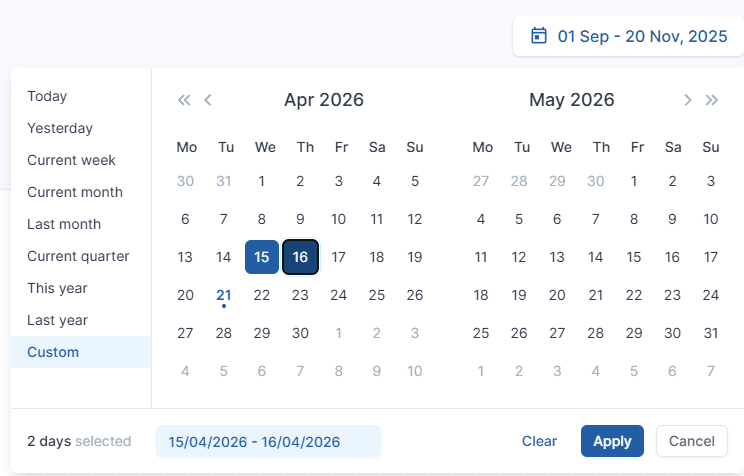
Select a custom date range (any range works — e.g. last 7 days).
This step is required. If you do not set a custom date, the from and to parameters will not be included in the generated API URL — and CasinoFlux will not be able to fetch data.
Step 5: Set Filters to 0
Make sure no filters are applied — all filter values should be set to 0.
Step 6: Generate the Report
Click Generate Report to run the report with your selected settings.
Step 7: Create a Preset
Once the report loads, click Create Preset. Name it anything recognisable — e.g. CasinoFlux — then click Create Preset to save.
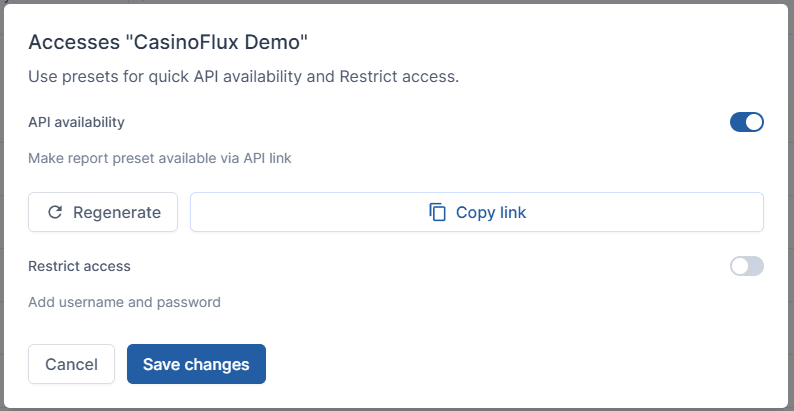
Step 8: Enable API Availability and Copy the URL
- Toggle API availability to ON
- Click Copy link
- Click Save changes
Step 9: Paste the URL into CasinoFlux
- In CasinoFlux, go to Offers → Create Offer (or edit an existing one)
- Open the API Setup tab
- Select Referon as the platform
- Paste the copied URL into the API URL field
- Save the Offer
URL Format Reference
A valid Referon API URL looks like this:
https://ro-affiliate.affina.com/statistic-service/report-preset/export?id=42159&token=fDFmZM8B...&from=2025-05-01&to=2025-05-13&download=true| Parameter | Description |
|---|---|
id | Your preset ID — generated automatically |
token | Your authentication token — embedded in the URL |
from | Start date of the report range |
to | End date of the report range |
download=true | Required flag for data export |
Always confirm the URL contains both from and to date parameters before pasting into CasinoFlux. A URL without dates will fail to fetch data.
Troubleshooting
API sync fails immediately — Check that the URL includes from, to, and download=true. Regenerate the preset if the token has expired.
Data is missing or incomplete — Confirm the preset was created with all columns selected and split by day. Partial column selection leads to missing metrics.
Token expired — Referon tokens can expire. Return to the preset in your dashboard, toggle API availability off and on again, and copy the new URL.
Need help? Contact CasinoFlux support with your Referon preset ID and Offer details.