
MyAffiliates
How to get your MyAffiliates credentials and API URL and connect them to CasinoFlux
MyAffiliates
MyAffiliates requires three values in CasinoFlux: a Client Identifier, a Client Secret, and a generated API URL. The credentials are created in the Authorisation section, and the API URL is generated from the Reports section.
CasinoFlux requires Client Identifier, Client Secret, and API URL for MyAffiliates.
Before You Start
Make sure you have:
- An approved MyAffiliates affiliate account with dashboard access
- Your account login password available (required during client creation)
Step 1: Go to Account — Authorisation
In your MyAffiliates dashboard, navigate to the Account tab and select Authorisation.
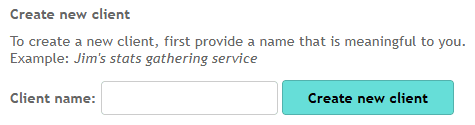
Step 2: Create a New Client
Click to create a new client. Name it anything recognisable — e.g. CasinoFlux.
Step 3: Confirm With Your Password
You will be prompted to enter your account login password to confirm the client creation.
Step 4: Copy Client Identifier and Client Secret
After confirming, you will be redirected to a page showing your Client Identifier and Client Secret. Copy both values immediately and paste them into CasinoFlux:
- Client Identifier → Client Identifier field in CasinoFlux
- Client Secret → Client Secret field in CasinoFlux
Do not refresh or navigate away from this page until both values are copied. The Client Secret is shown only once — if lost, you will need to generate a new client entirely.
Step 5: Go to the Reports Tab
Navigate to the Reports tab in your MyAffiliates dashboard.
Step 6: Select the Correct Channel
From the channel selector, choose the brand or casino this Offer is created for.

Step 7: Verify Required Columns Are Present
Ensure the Show campaigns column is selected, and confirm the following columns are visible in the report:
| Column | Description |
|---|---|
| Date | Required for day-level data |
| Impressions | Ad impression count |
| Hits | Click count |
| Signups | Registration count |
| First Deposit Amount | Value of first deposits |
| First Deposit Count | Number of first deposits |
| Total Deposits | Sum of all deposits |
| Bonus Cost | Bonus deductions |
| Net Revenue | Revenue after bonuses |
| Calculated NGR | Net Gaming Revenue |
| Qualified Players | Players meeting deal criteria |
| CPA Income | CPA commission earned |
| Revshare Income | Revenue share commission |
| Income | Total income |

If any of these columns are missing, contact your Affiliate Manager and ask them to enable them. Note that column header names may vary slightly between operators — the data must be present regardless of the exact label shown.
Step 8: Generate the API URL
Expand the Download options tab and click Display report. A new URL will appear in the expanded section — this is your API URL.
Step 9: Copy and Paste into CasinoFlux
- Copy the generated URL from the Download options section
- In CasinoFlux, go to Offers → Create Offer (or edit an existing one)
- Open the API Setup tab
- Select MyAffiliates as the platform
- Paste the URL into the API URL field
- Paste the Client Identifier into the Client Identifier field
- Paste the Client Secret into the Client Secret field
- Save the Offer
URL Format Reference
A valid MyAffiliates API URL looks like this:
https://login.njordaffiliates.com/statistics.php?p=&d1=2026-04-01&d2=2026-04-21&cg=&c=&m=&o=&s=&pr=&sd=1&sc=1&mode=csv&sbm=1&dnl=1| Parameter | Description |
|---|---|
| Base domain | Your operator's MyAffiliates login URL |
d1 / d2 | Date range — CasinoFlux replaces these dynamically |
sc=1 | Show campaigns — must be enabled |
mode=csv | Export format — must be csv |
dnl=1 | Download flag — required |
Troubleshooting
Client Secret lost — If you navigated away before copying the Client Secret, return to Authorisation, delete the existing client, and create a new one.
API sync fails — Verify all three values (Client Identifier, Client Secret, API URL) are entered correctly in CasinoFlux. Confirm the URL includes sc=1, mode=csv, and dnl=1.
Missing columns in report — Contact your Affiliate Manager and ask them to enable the required report columns on your account.
Wrong channel data — Confirm the correct channel (brand/casino) was selected before generating the URL. Each brand must be its own Offer in CasinoFlux.
Need help? Contact CasinoFlux support with your MyAffiliates Client Identifier and Offer details.