
Affilka
How to generate your Affilka API URL and connect it to CasinoFlux
Affilka
Affilka generates the API URL directly from the Statistics report in your dashboard. The URL is created when you export the report as JSON — the browser URL of that export is what you paste into CasinoFlux.
CasinoFlux only requires the API URL for Affilka. No separate API key field is needed — authentication is embedded in the URL via a token parameter.
Before You Start
Make sure you have:
- An approved Affilka affiliate account with dashboard access
- The required report columns enabled on your account (see Step 2)
Step 1: Go to Reports — Statistics
In your Affilka dashboard, navigate to Reports → Statistics.
Step 2: Verify Required Columns Are Selected
Go to the Columns section and confirm the following columns are available and selected:
visits_countregistrations_countdepositing_players_countfirst_deposits_countfirst_deposits_sumdeposits_sumngrpartner_incomefixed_per_playerprequalified_players_countqualified_players_count
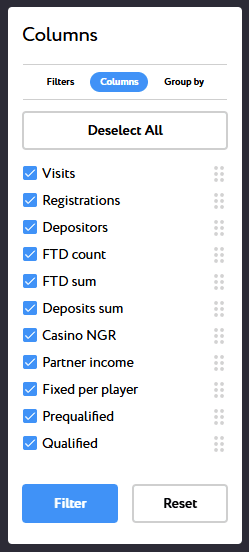
If any of these columns are missing, contact your Affiliate Manager and ask them to enable them. Without these columns, CasinoFlux cannot build a complete picture of casino performance.
Step 3: Configure Group By
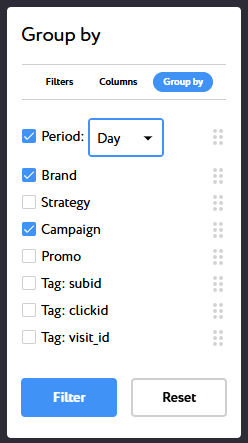
Go to the Group by tab and:
- Select Period — Day
- Toggle Brand to ON
- Toggle Campaign to ON
Step 4: Set the Brand Filter
Go back to the Filters tab and select the brand or casino this Offer is created for.
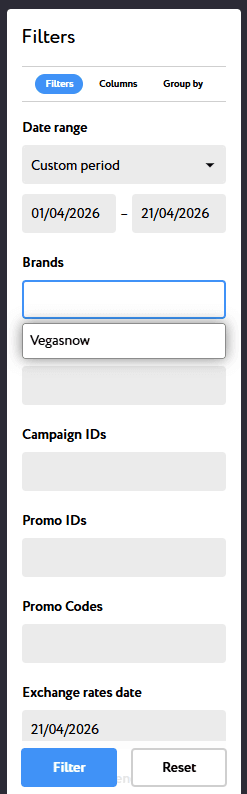
This step is especially important for multi-brand operators. Selecting the wrong brand or leaving it unfiltered will mix data across casinos and corrupt attribution.
Step 5: Apply the Filter
Click Filter to run the report with your selected settings.
Step 6: Export as JSON
Click Export report and select JSON.
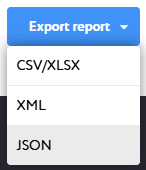
A new browser tab will open displaying the casino metrics in JSON format.
Step 7: Copy the Browser URL and Paste into CasinoFlux
- Copy the full URL from the browser address bar of the JSON tab
- In CasinoFlux, go to Offers → Create Offer (or edit an existing one)
- Open the API Setup tab
- Select Affilka as the platform
- Paste the URL into the API URL field
- Save the Offer
URL Format Reference
A valid Affilka API URL looks like this:
https://primetime.partners/api/client/partner/report.json?from=2026-04-01&to=2026-04-21&period=custom&exchange_rates_date=2026-04-21&convert_all_currencies=true&conversion_currency=EUR&columns%5B%5D=visits_count&columns%5B%5D=registrations_count&columns%5B%5D=depositing_players_count&columns%5B%5D=first_deposits_count&columns%5B%5D=first_deposits_sum&columns%5B%5D=deposits_sum&columns%5B%5D=ngr&columns%5B%5D=partner_income&columns%5B%5D=fixed_per_player&columns%5B%5D=prequalified_players_count&columns%5B%5D=qualified_players_count&group_by%5B%5D=day&group_by%5B%5D=brand&group_by%5B%5D=campaign&name=&token=b7e3f1a2d4c9082e56781234abcd5678&page=1| Parameter | Description |
|---|---|
from / to | Date range — CasinoFlux replaces these dynamically |
period | Must be custom |
columns%5B%5D | Each required metric column — all must be present |
group_by%5B%5D | Must include day, brand, and campaign |
token | Your authentication token — embedded automatically |
page | Pagination — must be 1 |
The exact URL will vary slightly between operators depending on their Affilka configuration. What matters is that all required columns, group-by settings, and the token are present.
Troubleshooting
JSON tab opens but data is empty — Confirm all columns are enabled and the brand filter is correctly set. Re-run the report and re-export.
API sync fails in CasinoFlux — Check that the URL includes group_by%5B%5D=day, brand, and campaign. A URL without these will not return usable data.
Missing metrics — Verify with your Affiliate Manager that all required columns are enabled on your account.
Token expired — Affilka tokens can expire. Log back in, re-run the export, and copy the new URL with a fresh token.
Need help? Contact CasinoFlux support with your Affilka brand name and Offer details.